A MATLAB FFmpeg wrapper
Why? MATLAB has a built-in video writer, but it is limited in what it can do. It is best for making uncompressed .AVIs in which the frames themselves are the data that need to be preserved. It can also make ‘MPEG-4’, but in general lacks the options one would find in a program specifically made for video encoding (which is fine, it doesn’t need to). However, I often have found myself needing to use the command line tool FFmpeg to make videos with frames created in MATLAB. So, as an example for anyone who finds themselves in a similar situation, here is a MATLAB FFmpeg wrapper to streamline that workflow. This wrapper is built for use on a windows system, so "C:\ffmpeg\bin" (or wherever your FFmpeg bin file is located, assuming you have already downloaded FFmpeg) will be needed to be added to your PATH for this run. A to-the-point guide on how to do so can be found here.
The wrapper’s main use case is to take a folder of frames and produce an '.mp4' that is significantly compressed. This is what the default options will create, though it also allows for a great deal of customization in terms of the tool’s flags. Here I will go through the most important inputs and explain their effects. The wrapper operates in two modes, the default expects frames in a single folder that are named with some sort of sequential pattern that you then specify, and a single, unchanging frame-rate applied to the whole video. The alternate mode works in such a way that you can specify the image paths in order and apply a unique frame duration for each frame, sort of like this example.
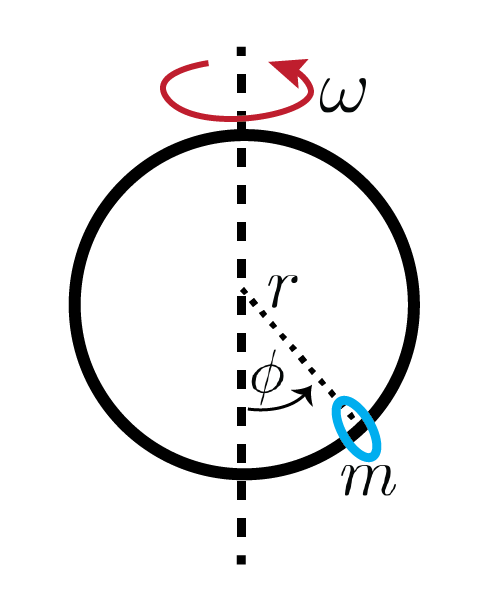
For this demo I’ll create an animation for a phase diagram for the following bifurcation problem: A bead (mass $m$) is free to slide on a hoop (radius $r$) that rotates with a constant angular velocity $\omega$ around a vertical axis. The forces on the bead are gravity, $mg$, and the centrifugal force, $mr\omega^2 \phi$, where $\phi$ is the angular position of the bead with respect to the direction of gravity. The non-dimensional governing equation is \begin{equation}\frac{d^2\varphi}{d\tau^2} = \sin(\varphi)\bigg[\cos(\varphi) - \frac{1}{\gamma} \bigg],\end{equation}where\begin{equation}\gamma = \frac{r\omega^2}{g} > 0, \quad \quad \tau = \omega t\end{equation}
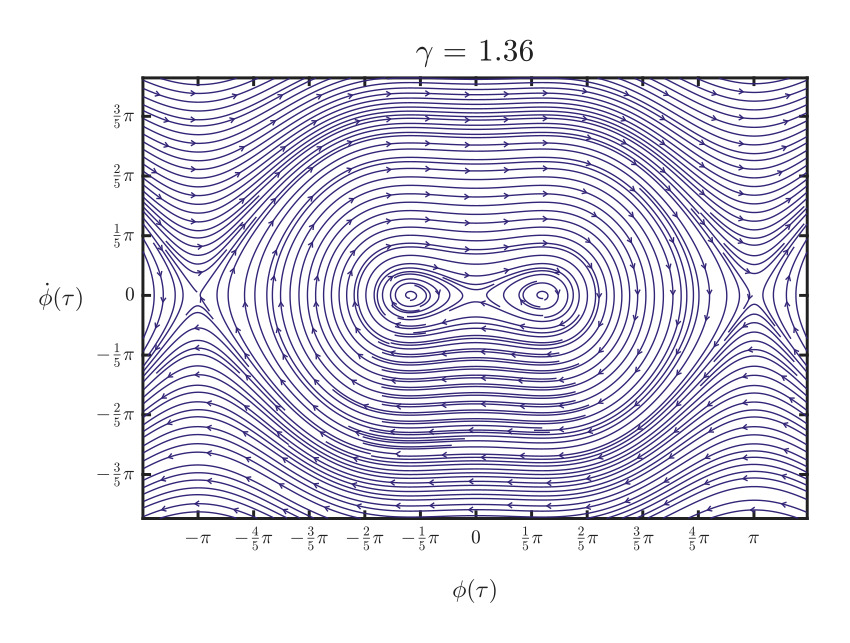
For the animation I’ll create 240 frames that show the phase diagram for $\gamma = 0.5$ to $\gamma = 1.5$. This problem has a bifurcation as $\gamma$ crosses 1, which is when the centrifugal force becomes large enough for the bead to find an equilibrium on either side on the vertical axis. I’ll show an example of a single frame below, then delve into the wrapper’s capabilities. The code will included at the bottom of this page and on my GitHub.
Shared flags
- encoder: By default the wrapper will use the libx264 encoder which is good for high-compression video that should play on just about anything. The presets and profiles are tied to the encoder, so be aware that if you change the encoder, the same presets and profile flags might not work. Default: "libx264"
- preset: controls the tradeoff between encoding speed and compression ratio. Default: “medium”
- profile: option to change encoder’s feature set. Some devices may support different profiles. The default for the wrapper is “high” which should be supported for all modern devices. Default: "high"
- movFlagOn: allows for progressive playback (video can start playing before being completely downloaded) Default: 1
- oddDimDivBy2: The encoder is expecting that the frames’ height and width are divisible by 2. This flag will automatically add padding if needed to the right and/or bottom of the images. If you want to scale the images to the divisible by 2 or otherwise, input that flag here (‘-vf ‘ included automatically). Default: "pad=ceil(iw/2)*2:ceil(ih/2)*2:color=0x"
- paddingBackgroundColor: the color of the background so the padding will blend with the image. Expects hex format. Default: “FFFFFF”
- customImgPathsOn: Enables alternate (concat) mode. Default: 0
- customFlag: Any additional flags that you would like to include. Default: ‘’
Default Mode (‘customImgPathsOn’ set to 0)
This is for when you have a set of images in a folder named with a standardized sequential order, with zero-padding. Below is an example of how those image names can be generated automatically.
- imagePattern: filename pattern for ffmpeg. Expects a sequential order of frames with zero-padding, starting with the lowest number. Default: "%04dFrame.jpg"
- frameRate: frames per second of output video. Default: 30
- startNumber: If you want to start at a frame other than the lowest number, set it here (don’t need leading zeros). Default: 0
- Total frames: ffmpeg will automatically go to the last number in the pattern sequence that exists in the folder. If you want to limit the last frame, do it here by setting the total number of frames to be used. Default: 0 (no limit)
- timeByTime: If instead you would like to limit total frames not by number of frames, but rather by total time of the created video [in seconds], use this argument. Default: 0 (no trim)

Alternate Mode (‘customImgPathsOn’ set to 1)
In this mode you’ll need to create a cell array of image paths and another array of frame durations, useful if you need to use frames for disparate places or need unique frame durations. Below is an example in which I want to pause at the first last and middle frame of the animation for 1 second.
- concatFrames: This should be a cell array 'nx1’ large, where ‘n’ is the number of image frames, and each cell is a string that is the absolute image path, in order. Default: empty cell array
- frameRate: This should be an array ‘nx1’ large of the frame durations [in seconds] in the same order as concatFrames.

The Wrapper
Here is the wrapper in its entirety. For reference, I am using ffmpeg version 6.1.1 built with gcc 12.2.0.